This is a review of all relevant spreadsheet-like products, services, tools, and technologies, as well as blogs, articles, news, and notes related to spreadsheets. I started this back in 2017, and I haven’t updated to it in a year or two, but it’s fairly complete. Since I’ve shared it with friends and colleagues working on spreadsheet-like interfaces, I thought I’d share it here as well. Never know who may find it useful.
Spreadsheets
These are the major spreadsheet products that are intended to be used as spreadsheets. They’re not necessarily competitors to what we’re doing, but are general-use products.
…starting with the “no-duh” ones.
Excel
- https://products.office.com/en-us/excel
- Gold-standard of sheets. Used by almost every company in the US and internationally. Not really going to go into a ton of detail here, simply because the product is just too big. I’ve written about it elsewhere.
Google Sheets
- https://www.google.com/sheets/about/
- Syntax that’s really close to Excel.
- Instead of VBA, lets you use App Scripts which is like javascript, and lets you call cloud resources.
- While Excel has more overall features, Sheets a few more formulas than Excel, and some of them are easier to use.
- Doesn’t do tables, but does do pivot tables, but only kind-of.
Airtable
- https://airtable.com
- Less technical, less configurable, but easily hits 80% of “average” users of Excel are doing; tracking items, summing columns, and doing burn-down charts, and calendars.
- Huge number of templates that are NOT toy examples - level of detail in templates is high.
- Tops out around 50K records before you have to get an enterprise contract. Hard to imagine it being used for anything data intensive, like business metrics (eg; MAU or CAC), or finance.
- Formula engine is interesting, really similar to Excel pivot table references.
Coda
- https://coda.io/templates
- A lot like Airtable.
- https://www.theverge.com/2017/10/19/16497444/coda-spreadsheet-krypton-shishir-mehrotra
- Notes from The Verge 2017 article:
- “Document so powerful you can build apps in it.”
- Similar to Airtable: Column names, better formula engine, etc.
- Numbers: “[Smartsheet, launched in 2006, has 70,000 businesses.]”
- Numbers: “[Quip did same thing and sold to Salesforce for $750M in 2016]”
- “[Productivity app.]”
- Sounds like they’re doing low-volume data.
- Pitching it as ‘Deep because the more you learn the more you can do. Simple to start, but has a depth to it that allows customization, like existing spreadsheets.’
Zenkit
- https://zenkit.com
- Basically like Airtable as well.
Causal
- https://www.causal.app
- Focused on numbers across time, grouping by dimensions.
- Seems much more like a traditional spreadsheet, with the exception that rows are collapsable.
- Formulas seem to work on table-columns, but use a clever-looking syntax editor that hides the lower level formula AST, making it easier to do vector math and time series stuff.
- Blog post about how it works at a low level: https://www.causal.app/blog/scaling
Quip
- https://quip.com/
- Like Airtable but super focused on being a CRM/Salesforce thing.
- Not truly a spreadsheet, but all of these Airtable-like things really show how Excel was being used by a solid percentage of the user base.
Rows.com
- https://rows.com/
- Like Excel, but lets you treat sheets as small, object-like things.
- Classic SaaS structure.
- Seems alright, but mostly like Airtable, or quip. Hard to see this being used for rigorous, Excel-like work. Run-A-Spreadsheet Software that lets you do cloud things with spreadsheets - not by pulling data in, but by giving your sheets a way to run in the cloud. These are OSS libraries, services, products, or other businesses.
SheetGo
- https://www.sheetgo.com/
- Good set of tools for automating simple sheets.
Easa Software
- https://easasoftware.com/
- Lets you run sheets on their servers, but isn’t much more specific than that.
- Difficult to tell exactly how or why they’re doing what they’re doing - but it looks like it’s high-touch SaaS or on-prem enterprise stuff.
- Difficult to tell how lucrative their thing is.
- Difficult to tell how human-usable or good it is.
Schema-In-A-Grid
- http://siag.nu/siag/
- Old school linux OSS.
- Useful as a reference point or possible source for formulas, but not really usable.
- I doubt anyone in the world is using this.
Webxcel
- https://github.com/michaelneu/webxcel
- “A REST backend built with plain VBA Microsoft Excel Macros”
- Toy thing. Not a real service. POC-level. Weird as hell.
Solver
- https://www.solver.com
- Enterprise heavy. Not back-door-ready.
- Full-featured, but also hard to tell how easy it is to use, and integrate. Sold to a lot of big companies, so for all I know it could be that it requires a lot of tooling to integrate.
OpenSolver
- https://opensolver.org/
- Basically gives the user a large tool-box of algorithms to mutate sheets (optimize, schedule, linear/non-linear solution finding, etc).
ActiveSheets
- https://www.activesheets.com/
- BI as hell. Broken parts of website doesn’t inspire confidence.
- Hilarious use of stock images, and business jargon. WebWorksheet http://webworksheet.com
- Compiles Excel into a single working webpage.
- Pretty neat. Crude, but effective.
- Can make stuff like: http://www.kaye.com/HACC/
Plena Data
- https://plenadata.com/
- Basically, “hey, we’ll take your data and use some sort of schema to put it into a spreadsheet for you.”
- Does not entirely address what happens after you have that data in a spreadsheet. So the spreadsheet is the end result.
Treegrid
- http://www.treegrid.com/Sheet
- There are a lot of features here, but there’s a lot to be desired when it comes to UI/UX.
- Basically an Excel drop-in for your product if you need spreadsheet capabilities. Similar to Handsontable.
Publisheet
- https://www.publisheet.com/
- Publish an Excel spreadsheet as a website.
- Subscription service. Clean, and slick. Looks good.
Ultorg
- https://www.ultorg.com
- “A user interface for relational data.”
- Lets you connect to DBs, and naturally query by nesting tables, filtering on each one.
- Instead of trying to model this in SQL, it uses its own implementation.
- As usual, HC comments: https://news.ycombinator.com/item?id=31219324
- This video is a good 8-minute introduction: https://www.hytradboi.com/2022/ultorg-a-user-interface-for-relational-databases
SheetHub
- https://sheethub.io
- Support 500+ functions, over 95% of those supported by Excel
- High performance and low latency, as low as 5 milliseconds2
- Highly compatible with Excel, and supports Macro and VBA3
- Multi-spreadsheet files cross-referencing
- Drag and drop, mark inputs + outputs, call in an API.
- Seems interesting, but niche.
- My guess is they either built a custom emulation engine (hard) or are wrapping OpenOffice or LibreOffice w/ the command-line (easy).
Other
These are comments, blogs, documentation, and articles about spreadsheets in general. Some comments are from news.ycombinator.com, and while I’m not sure exactly how measured, true, or precise the comments on HN are, I’ve taken ones that strike me as about right, or at least, a “true opinion” so to speak.
The Importance Of Excel - Sept, 2013
- https://baselinescenario.com/2013/02/09/the-importance-of-excel/#
- Look at financial institutions and how their poor management of spreadsheets resulted in an incredible loss of money.
- Seems like the sort of thing FAST is trying to rectify.
- Comments on ‘The Importance of Excel’
- A little dated - it seems like best practices have improved in the 6 years since these comments.
- Insightful comments:
- “I know I’m being cynical. And look, I GET that rogue spreadsheets can turn into productivity-damaging unseen business risks. But until the corporate “software project” culture understands why it happens and why people are often far happier with their clunky spreadsheet than with your shiny WPF app or web page, I don’t think this problem is going to go away.” - breckinloggins
- “I don’t see any reason why you can’t have the agility of Excel with a few
of the nice tools that modern IDEs have to make it easier to debug or secure
a spreadsheet “app”. Excel actually has a lot of features for preventing
issues such as formula debugging, input validation and named ranges that
make formulas more readable, but the UI is terrible and it’s not very
discoverable. The problem with Excel seems to be primarily that the MS
desktop monopoly made it very hard for people to market better UIs for the
“quick financial model” use case. The only way around that was either in B2B
sales (where the economics forced you into building big ERP systems where
management locked down the processes) or over the web, where we’ve had to
wait for browser technology to reach a sufficient level of power before such
a system could be built. I think since IE9, we’re now at that point. It
wouldn’t surprise me if we now start to see a multitude of apps chip away at
Excel’s dominance in each of its use cases (like trello is doing for the
’lists of stuff’ use case).” - d4nt
- https://fivetran.com is doing something similar.
- “I have worked with some immensely powerful and complicated spreadsheets
with entire worksheets nearly full of formulas and 10’s of thousands of
lines of VBA code. This includes spreadsheet driven systems trading 50-100
million dollars daily as black box systems. Nearly always, these started as
“prototype” systems that became so useful, so quickly that they end up as
“production” systems. This is the power of Excel. But… When spreadsheets get
this large and complicated they are incredibly fragile and become hugely
difficult to maintain and bug fix. It is just too easy to make an accidental
change and not know your spreadsheet is broken. The VaR example given in the
OP is just typical. Sure, you can protect sheets but as a
developer/maintainer you need access and then you can very easily break
things, especially because version control with spreadsheets can be next to
impossible. The moment you start taking your spreadsheets seriously, as a
business process, is the moment you need to consider very seriously recoding
them as a bespoke system using conventional software development.”
- ???
SeanDav Why You Should Replace Excel With BI - FiveTran.com
- https://fivetran.com/blog/replace-excel-with-bi
- “BI can handle the size of your data.”
- “[…share results in real time]”
- “BI gives you control over your data.”
- “…use FiveTran”
- Doesn’t really address reasons why Excel would be a problem, but they’re also posting this as an extension of the sales funnel.
How to create a RealTimeData server for Excel
- https://docs.microsoft.com/en-us/office/troubleshoot/office-developer/create-realtimedata-server-in-excel
- Basically allows you to write a server that speaks in a MS-Excel specific protocol to your sheet, allowing your sheet to poll this thing.
- I get the impression that this sort of thing is being used for trading - you run a sheet in a headless machine and instead of pushing data in, you write one of these servers and control it from the sheet, so your data is always up-to day. Then any trade you want to execute on can have this accessible data, so you’re guaranteed real-time info.
Excel_to_code - Converts some Excel spreadsheets to C
- https://news.ycombinator.com/item?id=9944341
- I don’t think anyone is actually using this.
EtherCalc
- https://ethercalc.net/
- Good review of different approaches to engineering.
- Those different approaches are pretty bad, or are pretty heavy.
- Doesn’t do a lot of the fine-grained features that you would expect even of a simple spreadsheet.
FastStandard
- https://www.fast-standard.org/
- “Promoting standardization in financial modeling.”
- Explicitly for Excel.
- Really solid - pretty much a code style guide.
- Almost all of these things could be solved by letting users define named things flexibly - basically pulling out grids and letting them be as granular as cells. Almost a python/jupiter notebooks product but with grids.
ExcelDNA
- https://excel-dna.net/
- Independent project to integrate .NET with Excel.
- Had a 1.0 release in March 2019.
- https://github.com/Excel-DNA/ExcelDna/releases
“I was wrong about spreadsheets” - blog post
- https://www.reifyworks.com/writing/2017-01-25-i-was-wrong-about-spreadsheets-and-im-sorry
- Basically saying that Excel is super accessible because you can just pop it open.
- A bunch of really good comments:
“Improving how we manage spreadsheets” - British Government
- https://dataingovernment.blog.gov.uk/2019/06/10/improving-how-we-manage-spreadsheet-data/
- Instead of fighting the use of spreadsheets, they’re embracing them and trying to make them safer.
- Create a couple of tools that can check them for errors, etc.
Joel Spolsky’s Excel Guide
- https://excel.secretgeek.net/
- Video on how to use Excel more effectively.
- Good tips, shows a few of the high-powered capabilities of Excel.
- Generally stuff that I know and would correct for, but is a good example of all the edge cases that even professionals do not know about.
- Shows a lot of features, but at each feature there are a bunch of “magic” things that I can imagine are really easy to mess up.
- Good outline single points of failure - some of them silent!
Summary Of Joel Spolsky’s Excel Guide
- https://maxmasnick.com/2015/09/15/excel/
- Solid summary that is searchable.
Open Office 3.X Calc Guide
- https://wiki.openoffice.org/w/images/b/b3/0300CS3-CalcGuide.pdf
- Documentation for Calc.
- Appears to be what Google Sheets used when building Sheets and writing documentation for it.
“Influencing mainstream software – Applying programming language research ideas to transform spreadsheets” - Microsoft
- https://www.microsoft.com/en-us/research/blog/influencing-mainstream-software-applying-programming-language-research-ideas-to-transform-spreadsheets/?OCID=msr_blog_PLspreadsheets_popl_highlights
- This is by far the best description of where Excel is headed, and the features that should be prioritized.
- “Spreadsheets are the world’s most widely used programming language, by several orders of magnitude. We asked ourselves whether it would be possible to apply programming language research ideas to make spreadsheets a better programming language? If we could, that would empower a huge user community to do more.”
- “Make Excel functions reflect the abstractions of our end users, by allowing end-users to define new functions using an ordinary worksheet, rather than by switching to a totally different language (and computation paradigm) such as Visual Basic…”
- “And ordinary Excel formulas can now compute array values, that “spill” into adjacent cells ( dynamic arrays).” Dynamic Arrays: https://techcommunity.microsoft.com/t5/Excel-Blog/Preview-of-Dynamic-Arrays-in-Excel/ba-p/252944
- As always, spirited HN discussion: https://news.ycombinator.com/item?id=18948715
Microsoft Excel Calculation View
- https://www.microsoft.com/en-us/research/uploads/prod/2018/10/sarkar_2018_calcview.pdf
- For a sheet/worksheet view all cell assignments in a key-value relationship. Basically a scripting-language-view.
Microsoft Excel Office 365 Episode 7 - Rich Data Types
- https://www.youtube.com/watch?v=gbImc7A8_Q8
- Introducing new data types. Basically cells that are records.
- Not retrieved from web-services; live, and embedded.
- Specific to Excel. Won’t really help with big-data stuff.
Dynamic Arrays In Excel (Spill Ranges)
- https://techcommunity.microsoft.com/t5/Excel-Blog/Preview-of-Dynamic-Arrays-in-Excel/ba-p/252944
- Introduces “#SPILL!” error when range is blocked. In Google Sheets this would result in a “#REF!” error.
- Dynamic arrays is what Google Sheets might call “Array Formulas.” In Excel: =A1:A10B1:B10 with dynamic arrays would result in a 10x10 grid. In Sheets, you would have to do something like =ARRAY_FORMULA(A1:A10B1:B10).
- Dynamic arrays shipping with: FILTER, UNIQUE, SORT, SORTBY, SEQUENCE, SINGLE, RANDARRAY. Many of these are formulas that Sheets already supports.
Elastic Sheet-Defined Functions: Generalising Spreadsheet Functions to Variable-Size Input Arrays
- https://www.microsoft.com/en-us/research/uploads/prod/2018/11/ElasticSDFs.pdf
- SDFs (Sheet Defined Functions) are really just ways that users are creating one-off, multi-formula functions to calculate a value.
- Good overview of why users might want this: a lot of users end up using VBA. A lot don’t know how or want to.
- Outlines a proposal to use more syntax to let users define SDFs.
- It seems like a lot of this is already being achieved by smart use of really simple features that exist in Excel. This just lets a user define a new function so that you can reuse a function, rather than defining it each time. That’s still valuable, but it seems like an unnecessary extension of the syntax that is already being pushed past the bounds of it’s own simplicity.
- It seems like an easier solution to this would be to author an API for dealing with cells, ranges and sheets, and let the user write some python. Leaning on an existing language that is well documented, and well-loved seems like an easier solution than increasing the complexity of the Excel syntax.
Mesh Spreadsheet
- http://mesh-spreadsheet.com/
- “A free, portable spreadsheet program.”
- Runs on JS - stores everything in JS. Similar syntax to Excel, but definitely not trying to match feature-for-feature.
- Quick User Guide: https://github.com/chrispsn/mesh/blob/master/README.md#quick-user-guide
- No one will use this, but it’s an interesting idea to play around with.
- Talk on it: https://www.youtube.com/watch?v=CEG9pFNYBCI&feature=emb_title
Excel Performance Notes - Microsoft
- https://docs.microsoft.com/en-us/office/vba/excel/concepts/excel-performance/excel-performance-and-limit-improvements
- Outlines improvements and reveals a little bit of the inner-workings of excel.
Stream Processing with a Spreadsheet - research paper
- http://hirzels.com/martin/papers/ecoop14-activesheets.pdf
- Abstract: “Continuous data streams are ubiquitous and represent such a high volume of data that they cannot be stored to disk, yet it is often crucial for them to be analyzed in real-time. Stream processing is a programming paradigm that processes these immediately, and enables continuous analytics. Our objective is to make it easier for analysts, with little programming experience, to develop continuous analytics applications directly. We propose enhancing a spreadsheet, a pervasive tool, to obtain a programming platform for stream processing. We present the design and implementation of an enhanced spreadsheet that enables visualizing live streams, live programming to compute new streams, and exporting computations to be run on a server where they can be shared with other users, and persisted beyond the life of the spreadsheet. We formalize our core language, and present case studies that cover a range of stream processing applications.”
- “This paper proposes the use of spreadsheets as a stream programming platform.”
- THIS IS COOL: Basically, let users create a spreadsheet where column(s) represent streaming data. They can do calculations on the column(s), returning one or many results. Then they should be able to compile and publish this sheet as something that can be used in a more live/prod-like/" real-time" environment.
- HN Comments: https://news.ycombinator.com/item?id=8184430
“FMD - Functional development in Excel” - Lee Benfield from Barclays Capital (2009)
- http://cufp.org/2009/fmd-functional-development-excel.html
- Talk + slides about what he built: a project/library to skip messy VBA stuff.
- Difficult to get a handle on what he’s doing, but it’s interesting to know that this is the sort of large-scale use of Excel that a lot of financial institutions use.
“Saving the World from Spreadsheets”
- https://www.youtube.com/watch?v=GyWKxFxyyrQ
- As usual, HN discussion: https://news.ycombinator.com/item?id=20491091
- “[Microsoft estimates that 750M users of Excel. (%7 of the world population).”]
- Spreadsheet errors basically ruined the economy of Greece.
- “State of the art” is manually double-checking your formulas. This is what the experts suggest…
- There’s apparently an article out there from Forbes titled “Sorry, Your Spreadsheet Has Errors ( Almost 90% Do)”.
- Thomas Herndon is the guy that did manual spreadsheet verification to prove that there were errors.
- Talks about CheckCell, ExcelLint.
- Input errors are a huge problem: “Roughly 1% of characters people mistype.”
- “[1 out of 20 cells manually typed probably has an error.]” (Woah.)
- “[Users often add a digit or remove a digit, changing the order of magnitude]”
- First, manual data entry is hard to do correctly. Second, writing formulas/code/Excel that uses that data is also hard to do correctly.
- One take away: Like code, if you’re not testing it manually, and no one is testing it for you manually, and you’re not writing tests, and the results aren’t “gut-checked” or the results aren’t used, why would it be correct? If a tree falls…
- “[A lot of public posted Excel sheets are filled with errors, or fudging.]” Look at the grades one that he shows around 19:36 to see what I mean.
- “The Bootstrap” - stats analysis using simulations. “[Resample samples]…
random sample with replacement, repeatedly, to get distribution of output of
calculation.”
- Requires a homogenous range.
- Allows you to find “outliers” that drastically change the output.
- “What is the likelihood of observing one of the simulations under the null hypothesis, and if it’s below [X] then we say it’s unusual.”
- Dude in audience at 30:29 describes it well.
- Formulas are easier to audit because they’re usually named w/ column, etc. Data is hard.
- Goes through a long process of describing how they gather data, etc. Good stuff, but the short and the long of it is CheckCell is good.
- Loops back around to the global finance sheet that had a lot of errors: CheckCell worked on it.
- ExceLint - static analysis, ranks errors and their fixes.
- Can find off-by-one-like errors. Formulas using off-by-one ranges, etc.
- Excel has its own error finder, but it gives a lot of false positives and false negatives.
- “Most errors are reference errors” - wrong row, wrong column, too short a range, too long a range, etc.
- “Looks for disruptions in rectangular regions.” Not just outliers. Looking for irregularity, where regularity is basically low entropy.
- “[Capture the relationship of cells/ranges and their relationship to one another.]”
- Looking for relationships that minimize entropy ("[Because users aren’t insane and they’re putting things in a rectangular grid.]"
- Looks for every rectangle (i.e. range) that when merged with a neighbor, would remain rectangular. That is considered a potential fix. Then you can simulate the fix as if you already did it, and check the entropy on that.
- A lot of the errors, and their origins have to do with basic Excel features. Some of these features were outlined as best practices in Joel’s “You suck at Excel” talk, which is kinda funny. Great power, Uncle Ben, etc.
- Dropped this one: “SUM is [something like 45% of formulas]”.
- “CheckCell: Data Debugging for Spreadsheets” - UMass.
- “Add-in for Microsoft Excel. Identifies cells that [have an unusually high impact on a sheets computations.]”
- Static analysis that sort of looks for hot-spots, and points of failure.
- Look at interaction of data and formula that consumes data.
- Designed to find data-errors.
ExceLint
- https://arxiv.org/pdf/1901.11100.pdf
- https://github.com/plasma-umass/ExceLint-addin
- “Add-in for Excel that finds formula errors” - from UMass, similar to CheckCell.
- Designed to find formula errors.
Parcel
- https://github.com/plasma-umass/parcel
- “An Excel formula parser”
- Not a ton of documentation, and not ready to integrate with anything else.
- Pretty solid as a reference point, given enough time to read it.
xlUDF
- https://docs.microsoft.com/en-us/office/client-developer/excel/xludf
- Thought I’d add this here, since it’s good to know the weird things you can do with Excel.
Apache POI
- https://poi.apache.org/apidocs/4.1/
- Java package for manipulating spreadsheet/Excel/XML files.
- Fun naming convention for sub packages.
Structuring Spreadsheets with the “Lish” Data Model (2017)
- http://oro.open.ac.uk/50150/1/eusprig%20submission%20Alan%20Hall%20-%20revisions%202017-06-13.pdf
- Proposal to add structure to the grid so individual cells know about the structure they’re a part of.
- Seems like they’re adding stuff to a spreadsheet to enforce the idea of tables, which is something Excel already does.
- “Lishes” introduce the idea of lists, and atoms, and basically key-values but with column/row as implicit keys.
Gencel: A program generator for correct spreadsheets (2006)
- https://www.researchgate.net/publication/220676617_Gencel_A_program_generator_for_correct_spreadsheets
- Abstract Summary: “[Spreadsheets are functional programs, but fall short because of errors. This is a template spec language, and corresponding system (Gencel), a system for generating reliable spreadsheets.]”
- Discussion on HN: https://news.ycombinator.com/item?id=18855336
- “VITSL” (Visual Template Specification Language).
- Gencel uses these objects: Template, Template Instance, Table, Repetition, and Expansion Area. Each of these is pretty self-explanatory, and can be thought of as precursors to Excel’s Table feature. They also roughly map onto ideas expressed in the FAST Standard.
- Architecture section is interesting: using VBA to talk to Haskell to generate and structures, updates, and type checking.
- Uses its own interface, but Excel as the engine, which is cool. If the model they’re presenting is rigid, and they don’t want users to do things outside of it, they build their own interface that only lets the users do good things.
- The interface is pretty cool. Explicit gap between columns and rows to indicate tables. Could also be achieved with separate grids, but I like the effect.
Representing and Editing JSON with Spreadsheets
- https://medium.com/@donhopkins/representing-and-editing-json-with-spreadsheets-8f8832db5239
- Half-decent article about how to get structured data into a tabular form. (Flatten, expansion, etc.)
- Doesn’t mention JSONPath which seems weird, since that’s a super-available option.
- Also, getting it into a flat format, and then filtering it is probably way easier than what he’s doing.
“Ask HN: Language compiled to Excel spreadsheets?” (2015)
- https://news.ycombinator.com/item?id=9941086
- Interesting discussion around intersection of code and spreadsheets.
“Ask HN: What do you use MS Excel for?” (2018)
- https://news.ycombinator.com/item?id=18130552
- Response: “[File viewer for CSVs, just to take a look]”
- Response: “[Predictive models for tennis matches.]” Cool!
- Response: “[Automated step in a Jenkins CI pipeline.]”
- Response: “[Maximizing profit in my EVE Online industrial and trading corporation.]” This kind of stuff is so cool. Dude is running a fictional company and maybe doing it in a more data-driven way than some real companies are doing it.
“Coda is a next-generation spreadsheet designed to make Excel a thing of the past.” - The Verge (Oct, 2017)
- https://www.theverge.com/2017/10/19/16497444/coda-spreadsheet-krypton-shishir-mehrotra
- “Document so powerful you can build apps in it.”
- Similar to Airtable: Column names, better formula engine, etc.
- Numbers: “[Smartsheet, launched in 2006, has 70,000 businesses.]”
- Numbers: “[Quip did same thing and sold to Salesforce for $750M in 2016]”
- “[Productivity app.]”
- Sounds like they’re doing low-volume data.
- “[Pitching it as ‘Deep because the more you learn the more you can do. Simple to start, but has a depth to it that allows customization, like existing spreadsheets.’]”
- HN discussion: https://news.ycombinator.com/item?id=15543181
- “[It turns out not having to name things is a feature.]” - It gives you flexibility.
- THIS IS REALLY INSIGHTFUL:
- “Excel really has two major ways of performing computations on data formulas within the grid and actions upon the grid. Despite the utility of the formula based dataflow model, there are too many operations that have to be performed as one-shot operations via commands (or scripted via VBA). Having formula based approaches for sorting, dividing into bins, etc. would be very useful.”
DataCommandr
- http://conceptoriented.com/
- “[…application for easily processing data in tables…. Column formulas]”
- “[Excel for big data] or [Big data calculator]”
- UI is a little crude, but the concepts make sense. Calculations are usually performed on columns, so just make formulas act on columns.
- Could be on to something with UI/UX redesign.
“Grid Studio” - Python project
- https://github.com/ricklamers/gridstudio
- Works with python + Pandas.
- Grid-like UI with simple python bindings, so you can see the data as you’re manipulating it.
- Code is pretty terribly written - by just one guy.
- HN Comments: https://news.ycombinator.com/item?id=20534729
Flowsheets v2 Video
- https://www.youtube.com/watch?v=y1Ca5czOY7Q
- Grid-like interface with a python-like language inside to allow you to manipulate data and see it as you change it.
CSB on the Web: A Primer
- https://w3c.github.io/csvw/primer/
- W3C doc on CSV standardization.
G Suite - Adding Cell-level history to Sheets
- https://gsuiteupdates.googleblog.com/2019/06/edit-history-sheets.html
- You can now sort of view cell history. You can see what it was changed from and when, but it’s hard to imagine this being particularly useful.
X-Spreadsheet
- https://myliang.github.io/x-spreadsheet/
- Zero-dependency spreadsheet for the web. Looks great.
“How to implement a spreadsheet” Blog post from (2015)
- http://semantic-domain.blogspot.com/2015/07/how-to-implement-spreadsheet.html
- Pretty good post on parts of the structure of a sheet.
SC: The Venerable Spreadsheet Calculator
- https://www.linuxjournal.com/article/10699
- A Linux tool for spreadsheet stuff.
UseSlate
- https://web.archive.org/web/20140914134152
- Old tool for visualizing the structure of a spreadsheet.
Turn Your Excel File Into a Web Application
- https://keikai.io/blog/p/currency-exchange
- Tool to take an Excel file and build a web app.
- Simple. Hard to imagine how useful it is.
Sheet 2 Site
- https://sheet2site.com/templates/
- Uses Google sheets to pull data and render it in a template.
- Comments: https://news.ycombinator.com/item?id=19968587
Good General HN Discussion from 2019
- https://news.ycombinator.com/item?id=19968271
- Generally good comments on why people think spreadsheets are used.
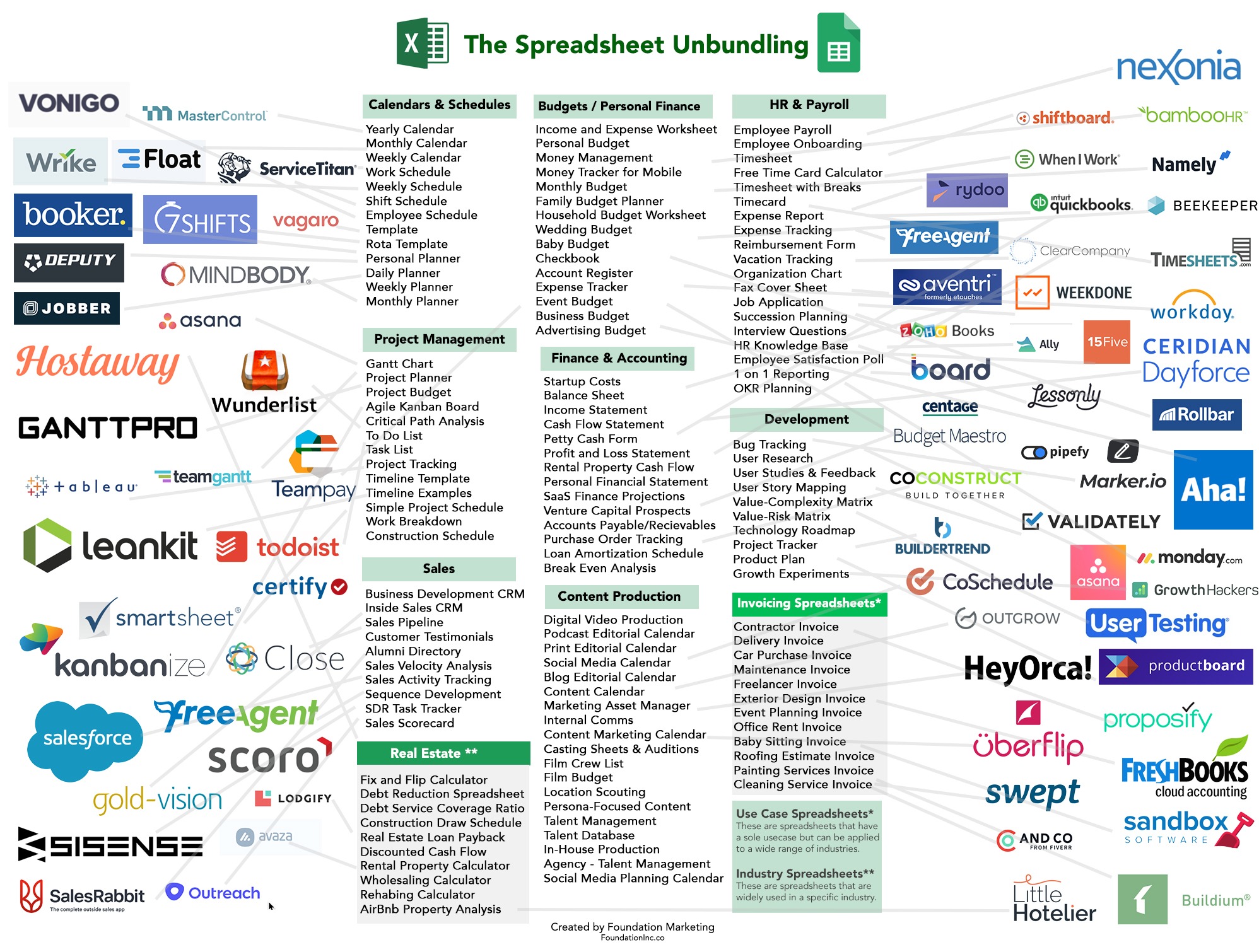
“These SaaS Companies Are Unbundling Excel - Here’s Why It’s a Massive Opportunity”
- https://foundationinc.co/lab/the-saas-opportunity-of-unbundling-excel/
- Here’s the key graphic: https://foundationinc.co/wp-content/uploads/2019/05/Spreadsheet-Unbundling.jpg
- All the features of Excel, when pulled out can be rolled into their own service.
- It’s a bit of a stretch, because many of these services are offering far more value than the feature they’re replacing, but it’s still solid research.
“The 3 Types of spreadsheets” - Medium (2018)
- https://medium.com/grid-spreadsheets-run-the-world/the-3-types-of-spreadsheets-3d021356c002
- Breaks it down into:
- Small databases - 2D datasets (CVS basically).
- Models - Projections, Analysis, Calculators.
- Business Processes - templates, move things between states.
Grid.is
- https://grid.is/
- Next-generation spreadsheet in Beta.
- “Turn your spreadsheets into beautiful web reports, dashboards and interactive applications!”
- Cross between Google Doc and Excel. Sort of like Jupiter Notebooks.
DashDash
- https://dashdash.com/
- “The spreadsheet that does more.”
- “dashdash is the spreadsheet that does more. Much more. Access business data and APIs. Find companies and people. Send emails. All using your spreadsheet skills.”
Notion
- https://www.notion.so/
- Close to Airtable, but the grid is only there in some sections.
- Limited formula features, seems mostly focused on small-scale tracking.
Chargd article about airtable
- http://char.gd/static/176/
- About the future of work.
Write Your Own Excel in F#
- https://news.ycombinator.com/item?id=20791775
- Guy built an Excel-like program using F#.
XLOOKUP for Excel - Microsoft
- https://techcommunity.microsoft.com/t5/Excel-Blog/Announcing-XLOOKUP/ba-p/811376
- XLOOKUP announcement for Excel.
Excel formula parser written in Golang
- https://github.com/xuri/efp
- Pretty self-explanatory.
- Based on https://ewbi.blogs.com/develops/2004/12/excel_formula_p.html