As a way to get back into a language, I like to build spreadsheet engines. I’ve gotten pretty good at it, even if I’m always missing some little feature. There’s always something that doesn’t make the cut, like formats, array-format ranges, or multi-dimensional arrays. But it’s fun, and interesting, and it’s a neat way to brush up on a programming language, in this case, Go.
You can read the source code here. github.com/vogtb/go-spreadsheet

Features and requirements
- Traditional A1-notation.
- Spreadsheet with named worksheets.
- Named ranges pointing to ranges of data inside worksheets.
- User should be able to enter named ranges, workbooks, cells and references in whatever order they’d like, and references should be resolved as fast as possible on entry.
- Minimal set of built-in functions like
SUM,AVERAGE,MEDIAN,MODE, and so on. - Volatile built-in functions like
NOWandTODAY. - Updates to any non-volatile cell will trigger downstream computation.
- Updates to ANY cell will trigger volatile formula re-calculation.
- Entire spreadsheet is stored in memory.
- Fast re-calculation, cached formula cells.
General architecture
The architecture I settled on is a sparse-representation using string interning where possible, and tracking bidirectional nodes in a dependency graph for recalculation along with an interpreted language that roughly maps to Go’s (ie C’s) typing like boolean, float64, strings, and a custom error implementation.
Sparse representation
Most sheets have contiguous blocks of data, but they’re sparsely accessed. For example, a sale calculator might only use 30 cells over a 50x50 grid of cells, for which there’s a single column of data 10 rows long and is accessed in an aggregation formula. Modeling a sheet with an entire NxN matrix doesn’t make a ton of sense. I chose to represent the worksheets as “chunks” of 256x256 cells, with individual cells as as arrays of numbers (using either a plain float64 to hold a number), booleans, or string refs that are soft pointers to string tables. (More about that later.)
Interning Tables
Interning tables are useful, mostly for string data. Storing numbers in a map doesn’t make much sense because the pointer is likely the same size as your number. But for strings specifically it makes sense to track each unique string and give it an ID. So we store number literals, IDs that reference strings in the string table, format IDs to reference strings in the formula table, IDs for formulas used in formula table. We also use the string table for storing error strings. Then within a given “chunk” for a worksheet, all we need to do is store the cell type and an ID that lets us lookup the value of the cell in the given table.
Excel, OpenOffice, LibreOffice, and – to the best of my knowledge – Google Sheets all use string tables. They’re just a plain good idea. Tabular data that contains strings almost always contain a limited number of unique strings, so tracking them by a uint32 ID is smart.
One of the only costs with string interning is that you need to reference count yourself, so you can drop the string when it’s no longer referenced.
// StringTable provides string interning for efficient string storage with
// reference counting
type StringTable struct {
  strings    map[string]uint32  // string to id mapping
  reverseMap map[uint32]string  // id to string mapping
  refCounts  map[uint32]int     // reference count for each string ID
  nextID     uint32
}
Chunking
We chunk our spreadsheet into 256x256 chunks within a worksheet. My hunch is that no one is setting one cell every 256 columns, so this is generally efficient. Allows us to load a single chunk into memory, and know it’s min/max values set, so we may even be able to skip it for computation. To further optimize this, within chunks we lazily initialize typed arrays that store actual values: number, string IDs, format IDs, types, formula IDs, and computed formula numbers, strings, and bools.
In a production setting I’d love to scrutinize the assumption about data homogeneity and chunk size. It could equally be true that we should make chunks single columns, but maybe 1024 or something in length, as a user could have a table-like structure, in which case the entries may be names, or IDs that are non-numeric, and so on, so by making them columnar in nature, we can sort of “type” our chunks. TBD.
// Chunk represents a 256x256 region of cells using structure-of-arrays layout
// for cache efficiency and minimal memory overhead. arrays are allocated
// lazily - only Types and OccupiedBitmap exist initially.
type Chunk struct {
  // always allocated fields.

  Types          []uint8 // cell type for each position (always allocated)
  NonEmptyCount  int     // count of non-empty cells
  OccupiedBitmap []int   // bit-packed array tracking which cells have data

  // lazily allocated fields.

  Numbers                []float64 // numeric values for NUMBER/DATE/BOOLEAN cells (lazy)
  StringIDs              []uint32  // interned string IDs for STRING/ERROR cells (lazy)
  FormulaIDs             []uint32  // formula table IDs for FORMULA cells (lazy)
  FormulaResultTypes     []uint8   // result types for FORMULA cells (lazy)
  FormulaResultNumbers   []float64 // numeric results for FORMULA cells (lazy)
  FormulaResultStringIDs []uint32  // string ID results for FORMULA cells (lazy)
  FormulaResultBooleans  []uint8   // boolean results for FORMULA cells (lazy)
  Formats                []uint32  // format table IDs for formatted cells (lazy)
}
One interesting optimization I stumbled on here (or maybe it’s the reverse and that I just wrote it inefficiently the first time) is that the chunks are 256x256, but when iterating over them we’re almost always iterating column-wise. Again, this is another assumption, but I think that users generally think of tables of data as having left-to-right entries, enter top-to-bottom. So if we make the major dimension of the slices to be column-wise, we’re iterating through sequences closer in memory, rather than skipping across them row-wise.
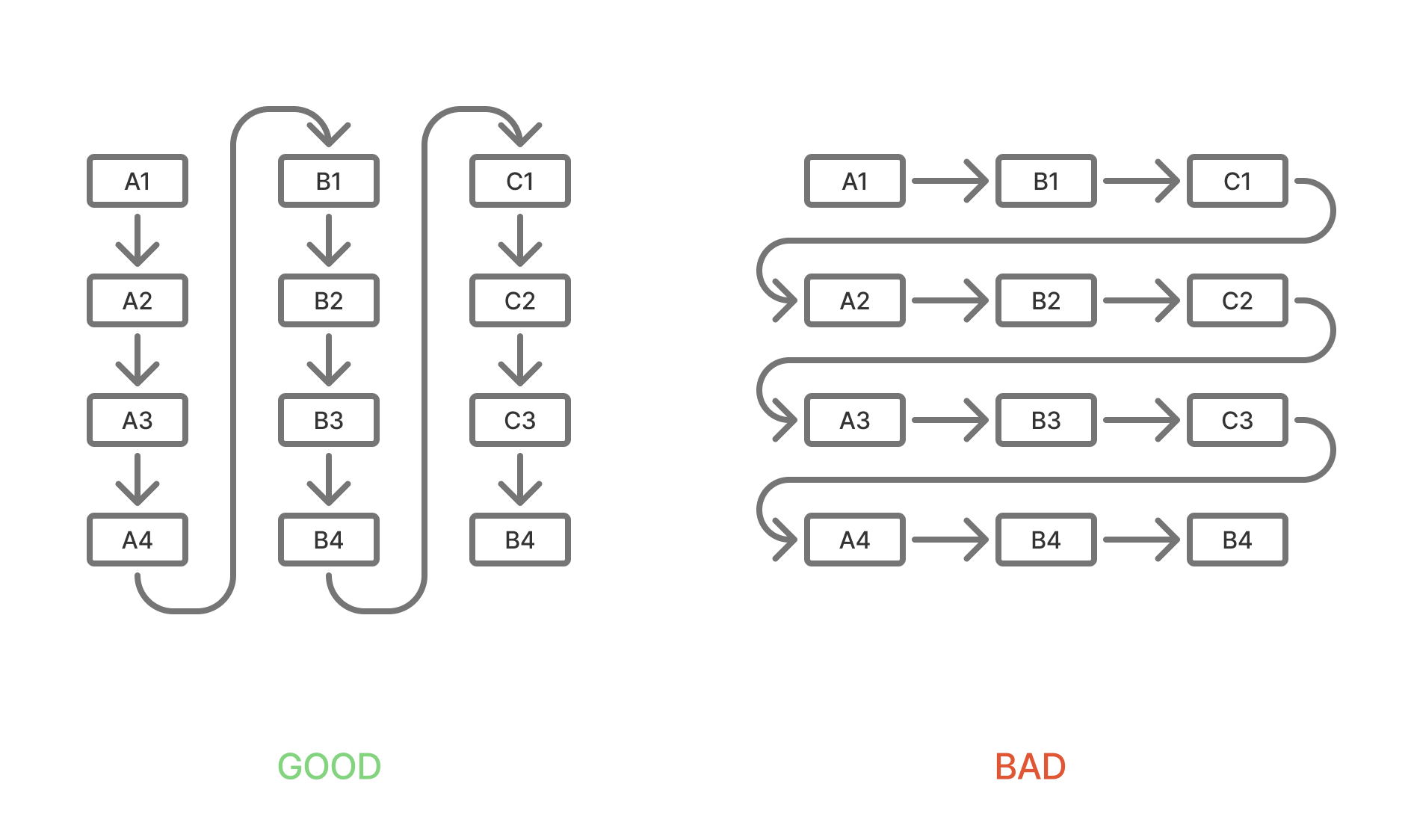
Here’s a little diagram to help visualize it, where a chunk is scaled down to 4x4. In the bad layout, an A1:A4 access would result in 3 skips, while in the good layout there’d be 0 skips.
Optimized for small writes, fast re-calculation
All of these strategies are geared towards trading memory for speed. Fundamentally, we’re storing a huge graph representing computation order, along with all underlying data in memory so that we can support arbitrary updates to cells that trigger full recalculation of all dependent cells. I’ll go into more detail on this later, but at best this means we have no calculations, or a few calculations on large ranges of homogeneously typed data. The overhead of this would mean a memory overhead of maybe a dozen bytes per cell. At worst, we have many rows and columns of highly referential formulas of varying data types, leading to nearly a kilobyte of overhead per cell.
The alternative to dependency tracking would be a full recalculation, which is wildly inefficient. If the product (a spreadsheet) is of any value, it’s probably got at least a fair number of formulas. Otherwise it’s basically a CSV editor. In my version we track forward and backwards dependencies. We call these precedents and dependents are easier to read and work with than calling them dependents and dependencies.
We track this in a dependency graph, but it’s a bit too much work to build the graph out and traverse it by un-computed degree. For starters, you need to build the entire graph in-memory on each compute, or you must track the graph every time you add or remove a formula. I’d like to build this out so we mutate it incrementally, but at the moment, something in my gut tells me its just a bit too clever. The simpler, more pragmatic alternative is to use stack-based recursion, and just pick a formula, calculate it, recursing if it depends on unsolved formulas. This gets us an implicit graph traversal, with a roughly equal memory profile in normal spreadsheet conditions. Rarely do users chain their formulas together deeper than, say, 1000 references. We can allocate and maintain a stack that’s large, so we don’t need to realloc when we grow to big, and just use that on each calculation process. This is easier to reason about than scanning ALL dependencies, and building an in-memory graph structure.
In previous versions of my spreadsheet engine, I’ve attempted to represent a spreadsheet as our own instruction-based VM. It’s fun, but boy does it suck to work with. Loading and executing instruction on a contiguous memory model is fun to think about, but not my realm of expertise. So I chose to not do in this engine. Maybe another time.
Interpreted formula language
Our formula language (eg =SUM(D4:D9999)) is an interpreted one. We’re mapping types straight on to Go:
- numbers -> float64
- boolean -> boolean
- text -> string
- null -> nil
- range -> Range
- reference -> Reference
To achieve this we use a Primitive type and Go’s any like this type Primitive = any. Honestly, it’s been a number of years since I’ve worked with Go, or their generic types, but any is literally just interface{} . So by using type Primitive = any and then switching based on what type the Primitive value is, we’re more easily able to have dynamic typing in our spreadsheet. Fairly easy.
This makes our formulas look more complex than they need to be, but they’re not that bad.
func (bf *BuiltInFunctions) AVERAGE(args ...any) (Primitive, error) {
  sum := 0.0
  count := 0
  for _, arg := range args {
    if err := checkForError(arg); err != nil {
      return nil, err
    }
    if r, ok := arg.(Range); ok {
      for value := range r.IterateValues() {
        if err := checkForError(value); err != nil {
          return nil, err
        }
        if value != nil {
          if num, ok := toNumber(value); ok && !math.IsNaN(num) {
            sum += num
            count++
          }
        }
      }
    } else {
      if num, ok := toNumber(arg); ok && !math.IsNaN(num) {
        sum += num
        count++
      }
    }
  }

  if count == 0 {
    return nil, NewSpreadsheetError(ErrorCodeDiv0, "Division by zero")
  }

  return sum / float64(count), nil
}
Lexing and parsing our formula language is one of the trickier parts of our program. I’ve used lexers/parsers before like Antlr, JIISON, and Tree-sitter, but this is only the second time I’ve written my own and it is rough. I’m not insane, so I’m not trying to to error recovery or anything fancy, so I had an okay time of it, but it still takes a bit of work. Fun. Interesting, but I’d much prefer using tree-sitter next time.
The reason I wrote my own parser instead of reusing an existing one out there (like Tree-sitter) was because I wanted to be able to easily compile this to WASM, and I’ve tried doing that with Go and Tree-sitter in the past and it’s challenging. I also don’t need a lot of the fancier features of Tree-sitter like their editing capabilities.
// ParseNumber parses a number from a string
func (p *Parser) ParseNumber(input string) (ASTNode, error) {
  // create a context-aware lexer for numbers
  lexer := NewLexerForNumber(input)
  tokens, lexErrors := lexer.Tokenize()
  if len(lexErrors) > 0 {
    return nil, NewSpreadsheetError(ErrorCodeValue, fmt.Sprintf("lexer errors: %v", lexErrors))
  }

  if len(tokens) == 0 {
    return nil, NewSpreadsheetError(ErrorCodeValue, fmt.Sprintf("no tokens found in input: %s", input))
  }

  // handle unary minus/plus
  value := 1.0
  tokenIndex := 0

  if len(tokens) >= 2 && tokens[0].Type == TokenUnaryPrefixOp {
    switch tokens[0].Value {
    case "-":
      value = -1.0
    case "+":
      value = 1.0
    default:
      return nil, NewSpreadsheetError(ErrorCodeValue, fmt.Sprintf("input is not a valid number: %s", input))
    }
    tokenIndex = 1
  }

  if tokenIndex >= len(tokens) {
    return nil, NewSpreadsheetError(ErrorCodeValue, fmt.Sprintf("input is not a valid number: %s", input))
  }

  token := tokens[tokenIndex]
  if token.Type != TokenNumber {
    return nil, NewSpreadsheetError(ErrorCodeValue, fmt.Sprintf("input is not a valid number: %s", input))
  }

  // parse the number value
  numberValue, err := strconv.ParseFloat(token.Value, 64)
  if err != nil {
    return nil, NewSpreadsheetError(ErrorCodeValue, fmt.Sprintf("invalid number format: %s", token.Value))
  }

  finalValue := value * numberValue

  return &NumberNode{
    Value:    finalValue,
    Position: NodePosition{Start: tokens[0].Pos, End: token.Pos + len(token.Value)},
  }, nil
}
Computation-focused structures
I’m still on the fence about whether this was good or bad, but I pass the parser context into the sheet, so when we resolve worksheet references, we can ALWAYS resolve them to a worksheet ID, which is just an int. I wanted anything that could parse properly to already be resolved in the context of the sheet by the end of parsing, even if an unknown worksheet reference resolved to a 0 (unknown) worksheet ID.
We also allow for tracking non-existent worksheets by maintaining a map of IDs (other than 0) that are unknown, and a map of worksheet names to those IDs. We represent named ranges similarly, allowing for unknown and non-existent named ranges.
This gives us a couple of powerful features.
Firstly, we can renaming worksheets and named ranges without changing their ID. We just change the name, and if all of our formulas are stored as ASTs with the worksheet ID in them, we don’t have to look all of them up and rewrite the formula itself until we serialize to disk. Even then, we’re not obligated to write the formulas back out as long as we don’t mind ignoring the specs of SpreadsheetML, which I don’t mind, those specs have a lot of stuff in them, and I’m having fun here. I’m not a specifications cop.)
Secondly, it lets us represent formulas in a compute-friendly structure, without having to store the original in the same struct. We parse it, ignoring whitespace and non functional characters, put the AST in contiguous memory, and move on. If we add a UI to this later, we can just serialize and cache the formulas as strings, but it’s not necessary to computation at the moment so we can drop that requirement.
The alternative is to just parse to a context-less AST, where worksheet and named ranges are just strings, and we don’t resolve them until compute. This is fine too. Go uses string descriptors, so passing around the strings to functions wouldn’t be a big deal, but string comparison is always slower than comparing scalars.
So our structures are:
WorksheetTable: tracks names and IDs and the hybrid cell storageNamedRangeTable: tracks named ranges by IDStringTable: strings by ID, across all worksheetsFormulaTable: formulas by ID, across all worksheetsFormatTable: formats by ID, across all worksheetsDependencyGraph: cross-worksheet formula tracking, with volatile and “dirty” cellsCalculationStack: stack-based calculation state/orderWorksheetHybridCellStorage: per-worksheet cell storage, storing ChunksChunk: 256x256 storage structure for cells, tracking types and formula results as well
To add to this, we’ve got some structs that hold a lot of references to our tables:
Storage: refs to almost all other tablesSpreadsheet: tracks a current worksheet ID (for parsing, and computation) a long with storageParserContext: access to parts of the spreadsheet by reference so we can resolve named ranges and worksheet names to IDs, for example.
I built this all piece by piece from the ground up, not really focusing too strongly on architecture, and to be perfectly honest, it shows. Because of my desire to parse formulas and resolve references into computable structures in the same step, we end up with nearly everything having access to the Storage struct. All in all, there’s some opportunities here to simplify, and maybe just build everything off the Spreadsheet? This is the tough part about building something like this; I feel like I’ve still got OOP-brain from writing Java for 5 years.
Performance and memory
It’s funny just how much overhead we dedicate to dependency graphing. Because we value speed, we’re trading memory for CPU. But we still need to be somewhat memory efficient.
In general, the measurement of average bytes per cell is high when there are many formulas or interspersed cells of varying types, and low when there are many numbers and few formulas working on them.
Years ago I did independent contracting work automating spreadsheets. My experience was that most spreadsheets are small to medium sized, contain a reasonable number of formulas, and are primarily numbers based.
An average use case would be a sales agent’s pricing sheet where there are maybe 1000 rows of static data detailing some pricing variables, then 6 to 8 formulas that are mostly SUM, COUNT, and AVERAGE. In this case, and even more complex ones, our bytes per cell is pretty low.
| Test | Avg | Rate | Mem/Cell |
|---|---|---|---|
| Simple 100 | 0.97ms | 10.3K c/s | 3.8MB |
| SUM 10K | 5.64ms | 8.9M c/s | 680B |
| Complex 500 | 35.69ms | 16.8K c/s | 108KB |
| Volatile 98 | 5.67ms | 17.3K c/s | 497KB |
There are some fairly obvious things here, but it helps to confirm. Best throughput and most memory efficient test is summing a lot of numbers, while the slowest test is use of complex formulas.
- Best throughput: Large SUM (8.9M cells/sec)
- Most memory efficient: Large SUM (680B/cell)
- Slowest: Complex formulas (35.7ms avg)
Synchronous and asynchronous calculation
I started this with the goal of getting it running in WASM, and there was a reason for that. I build a lightweight UI for editing spreadsheets because I often times find myself with ideas for extending a spreadsheet or experiments that I want to try. Building a whole new UI each time for each experiment (or worse, trying to modify someone else’s from Github) is a very painful and boring process.
I wanted to be able to compile this to WASM, so I could run an in-memory spreadsheet with a frontend for experimentation purposes. The challenge when running a large computation chain, or even a small one, is the cost of doing it synchronously and locking up the UI.
Additionally, I’d like to be able to refresh without losing everything.
One way to make sure you don’t lose everything is to snapshot the WASM memory array, and serialize it to IndexedDB. I’ve tried this with SQLite WASM experiments and it works really well. Like, it blows my mind I can add a button labeled “snapshot” and click it and wait a second and then refresh to have it load in the exact state my VM.
But another feature I’d like to have is not storing the entire sheet in memory in the first place. Excel still largely stores the entire sheet in memory, as does OpenOffice. Google Sheets obviously doesn’t, but I’d be very surprised if spreadsheets over a certain size have a partial-loading/compute strategy in their corresponding service inside Google’s cloud.
So to do this, we need to be able to offload regions of data to disk, and one way to do that is to use IndexedDB. If we abstract away the IndexedDB and WASM requirements, we get this: we want to pass a block of data to a separate thread or process in serialized form to save it, and we want to request a block of data from the same thread or process in order to load it.
The implication here is that loading/unloading blocks could affect computation as we may need to wait to load in, or wait to load out so that we can load in, if we’re intent on keeping our memory footprint small. This is essentially a yield pattern for scheduling. When we run Compute() on our spreadsheet, what we really want is Process() where we process N cells, or N units of computation, before yielding to another thread. A processing loop like this would allow us to us JS (or a OS thread) to run Process() in a loop, occasionally processing messages and passing them to the VM to load data, or unload data, or just read data for the UI.
I’ve not built this out quite yet because VM scheduling (metering?) seems like a real rabbit hole, and is really only possible once I get everything else stable and working correctly.
Storage
At the moment, the entire spreadsheet is in-memory. But I’d like to be able to store the sheet in a computation-friendly format. The naive way to do this would be to make the storage block a simple Chunk. We would try to put some of our dependency graphing info inside of the chunk, add a top-level index for tracking chunks and worksheets. But that’s not the end of it; all of our tables (string, format, formula, named ranges, and worksheets) are top-level, and store across worksheets, while Chunks are at the worksheet level. We would have to break these up, or make them per-Chunk. Putting these tables inside the chunks would be counter productive, and defeat the purpose of the tables in the first place. The string table for example, would be very inefficient as it would only be able to compress the strings in the 65k entry Chunk.
A more advanced way to do this would be to NOT tie the Chunks to any storage mechanism. They’re fundamentally an in-memory, computation based cache-focused strategy for effective computation. The tables, however, all follow a similar pattern: they’re “tables” of data mapping ints to strings and vice-versa. The natural thing to do here would be to implement a page-based storage format, add some caching on top of them, and make the table access patterns transparent to that.
We could do this with MMAP, or our own paging/caching strategy. If we’re trying to make this storage agnostic (IndexDB, FS, MMAP, whatever) then we’d have to implement our own interface for page access.
Or we could implement some sort of transaction logging pattern, where we have a “write-ahead log” and write changes to it. This could be on the same thread or a different one, but periodically we would checkpoint the log, and know that we’ve stored values up to a certain point.
At this point, I’m saying SQLite without saying SQLite, so let’s just say it. SQLite.
We could use SQLite tables to store our tables, and use some settings that lock how much memory we’re using. In a WASM deployment, we’d need to write an underlying VFS that uses IndexedDB to load regions of raw binary data, but I’ve done that before so it wouldn’t kill me.
Still, it may be beneficial to align our computation and storage models. This is an open problem that I can’t seem to find a satisfying solution to. If spreadsheet use was more table-based, there are obvious row-based and column-based techniques that could help us. But spreadsheets are basically big graphs of computations interspersed with data that’s probably storable in efficient structures, but not necessarily.
Right now the plan is something like this:
- implement a paging system similar to sqlite
- pages map directly to chunks
- separate in-memory chunk dependency graph (think: index or “chunk graph”)
- use chunk graph to fetch pages, computing in order
- cache hot chunks (…what a phrase)
Something like that. Still thinking this one through…
Future improvements
Some things I’d like to work on around this:
- Storage/persistence.
- Use paging to aligning storage and computation.
- PivotTables (yikes!)
- Efficient bulk loading.
- Columnar storage.
- Merging a spreadsheet-like computation graph to a columnar storage engine.
The source code for this project can be found on GitHub at vogtb/go-spreadsheet.