Glade is a cross-platform GUI library for Typescript that uses WebGPU to render apps at >60fps, for browsers and native macOS.
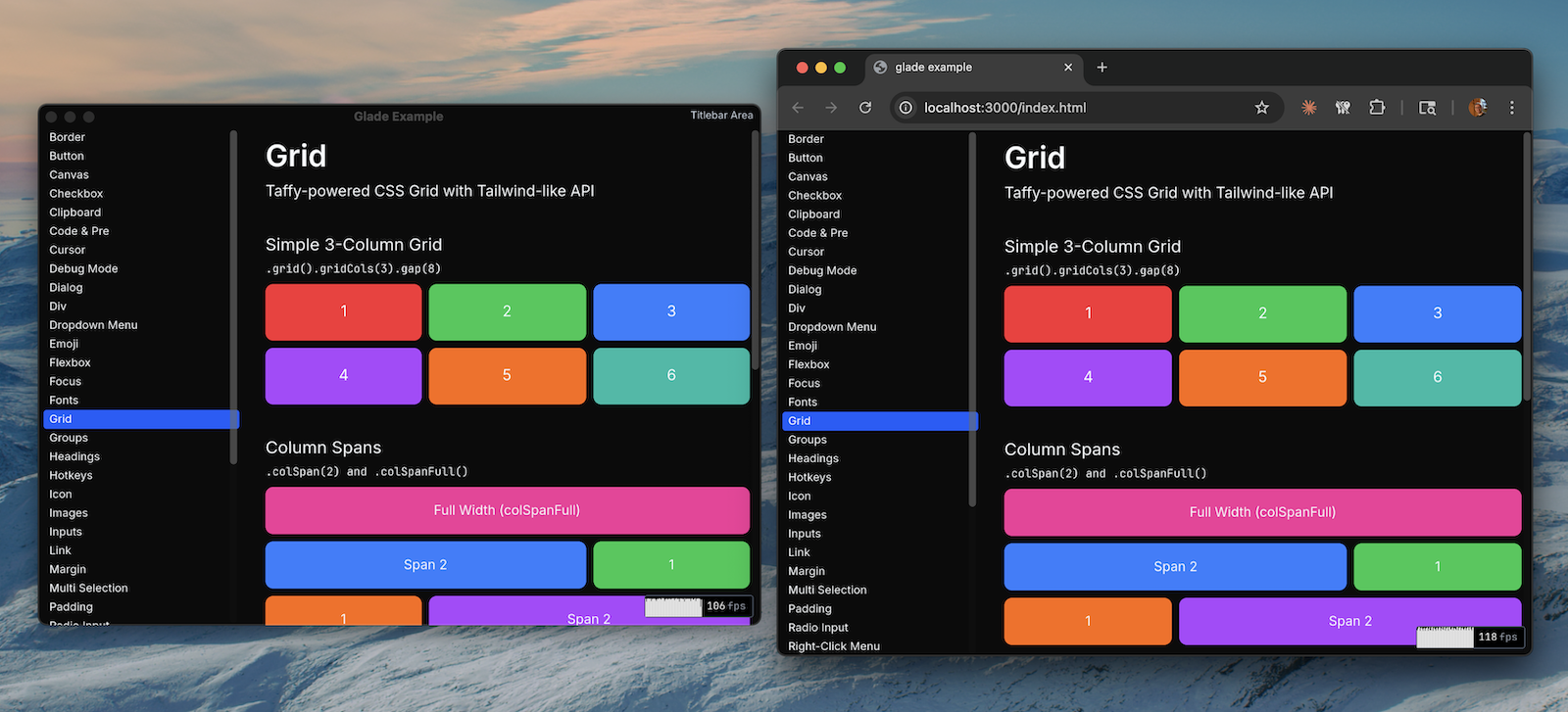
Glade is basically a library for writing cross-platform graphical applications with TypeScript and JavaScript. It includes an application framework and component library (text, inputs, flexbox layouts, etc.), all drawn using WebGPU. For browsers, it renders to a canvas element. For native macOS, it renders to a GLFW window via Google’s Dawn WebGPU implementation.
Glade is a backronym for GL-assisted Drawing environment, which seemed like a fun name when this project started, because it originally used WebGL/OpenGL. It now uses WebGPU, but the name stuck. Glade is largely based on GPUI and egui, but written in Typescript rather than Rust.
Features
A quick overview of what Glade can, can’t, doesn’t, won’t, or could do, and why. For more information on the “why” or “how” please read the README.md section below this one.
| Name | Status | Details |
|---|---|---|
| Flexbox Layout | ✓ | Flexbox layout implemented. |
| Grid Layout | ✓ | CSS Grid layout implemented. |
| Table Layout | ✓ | Table layout implemented. |
| Font rendering | ✓ | rustybuzz shaping, glyph caching, and font fallback; Noto Color Emoji default. |
| Monospaced fonts | ✓ | Monospaced font stack support. |
| Style utils | ✓ | Tailwind-style utility props on elements and components. |
| Text editing | ✓ | Selection, range editing, select-all, and clipboard copy/paste supported. |
| Static binaries | ✓ | Bun FFI + file embedding for single, self-contained executables. |
| macOS 15.0+ | ✓ | Native support for macOS 15.0+. |
| Chrome 113 | ✓ | Browser support for Chrome 113. |
| Safari 26 | ✓ | Browser support for Safari 26. |
| Firefox 141 | ✓ | Browser support for Firefox 141. |
| Custom cursors | ✓ | Tailwind-like cursor set: pointer, text, default, and more. |
| 120fps target | ~ | Depends on components on the page. Demos run between 60 and 120. |
| SVGs | ~ | Lyon-based path parsing; renders SVGs ok. Room for improvement. |
| Elements | ~ | Core elements and primitives, more possible. |
| Components | ~ | Buttons, tooltips, tabs, scrollbars, dialogs, inputs; more possible. |
| Native emoji | ✗ | Possible for macOS to access Apple Color Emoji rather than our embedded one. |
| Generated docs | ✗ | Auto-generated docs for APIs and components. |
| Prose utils | ✗ | Common primitives like p(), em(), strong(), span(), and kbd(). |
| Directional borders | ✗ | Per-side borders on divs and other components. |
| Drag and drop | ✗ | Pointer-driven drag, drop targets, and transfer state. |
| Text ellipsis | ✗ | Truncation and ellipses for overflowing text. |
| Rich text composition | ✗ | Composing text in one line like you would with <p>, <span>, <strong> and so on. |
| Glyph serde | ✗ | Using font shaping in WASM adds overhead per frame. |
| Layout caching | ✗ | Could improve rendering speed by maybe ~30%. |
| macOS file menu | ✗ | While not available in browser, could be useful for macOS builds. |
README.md
I originally started building this as an OpenGL/WebGL cross platform proof-of-concept, and then it sorta snowballed from there. I like building websites and web apps and so on, but occasionally it’s just a little unsatisfying to build something that, in theory, can run 120fps, but not if you’re doing anything interesting. There’s a limit to how fast you can go on the FPS-o-meter while working with the DOM. Seems like the DOM is a rather roundabout way of building fast GUIs anyways.
Glade is largely based on GPUI and egui, but written in Typescript rather than Rust. Last year I worked on a project that used Dawn, WebGPU, and Zig to do essentially the same thing that Glade does, but it’s hard enough learning one new thing, and much, much harder to learn two new things at once. So I used Typescript, a language I know and (mostly) like.
At its core, Glade’s render loop is essentially GPUI’s: submit constraints for layout, prepaint, paint, and render.
Glade takes “elements” (the simplest unit of the UI) and their layout, and paints them into layers by groups. You have background primitives, text, images, and deferred elements. It takes your components and classifies them into these groups inside a scene (basically just primitives), then paints them using the painter’s algorithm, back to front, so things stack correctly toward the user.
For each primitive, we can use specialized WGSL shaders to render that element on screen. That’s the nice thing about WebGPU; I don’t have to write shaders for the browser, AND Metal shaders for macOS.
Most of the hard parts of the render loop are actually not parts I’ve written. Our layout engine is a wrapper around Taffy, built as a WASM module, and embedded in our JS. We do a similar thing for SVGs, and text shaping, using Lyon for SVG parsing and rustybuzz and cosmic text for text shaping. These are WASM modules as well. I could have compiled these as native code for macOS, but on the whole, it seemed unnecessary, as we still need to cross the ABI boundary.
That’s actually the most expensive part of rendering a single frame: interacting with the layout engine over WASM. Because I’ve not implemented any custom performance optimizations, we’re re-rendering the app every single frame. And the first part of that frame is requesting the layout, which requires us to submit (serialize) ALL element/component constraints to our layout engine.
Apart from those three bugaboos (layout, svg, shaping) the rest of the code is fairly element-specific, but not wildly complex. Platforming is fairly straight forward as well. In our code, we have a @glade/platform interface that must be implemented by @glade/macos and @glade/browser. It’s just this.
export interface GladePlatform {
  readonly runtime: GladePlatformRuntime;
  readonly clipboard: Clipboard;
  readonly colorSchemeProvider: ColorSchemeProvider;

  requestAdapter(): Promise<GPUAdapter | null>;
  requestDevice(): Promise<GPUDevice>;
  getPreferredCanvasFormat(): GPUTextureFormat;

  createRenderTarget(options: { width: number; height: number; title?: string }): GladeRenderTarget;

  now(): number;
  requestAnimationFrame(callback: (time: number) => void): number;
  cancelAnimationFrame(id: number): void;

  decodeImage(data: Uint8Array): Promise<DecodedImageData>;

  openUrl(url: string): void;

  runRenderLoop(callback: RenderCallback): void;
}
GladeRenderTarget {
  readonly width: number;
  readonly height: number;
  readonly devicePixelRatio: number;

  configure(device: GPUDevice, format: GPUTextureFormat): void;
  getCurrentTexture(): GPUTexture;
  present(): void;

  resize(width: number, height: number): void;
  destroy(): void;

  onMouseDown?(
    callback: (x: number, y: number, button: number, mods: Modifiers) => void
  ): () => void;
  onMouseUp?(callback: (x: number, y: number, button: number, mods: Modifiers) => void): () => void;
  onMouseMove?(callback: (x: number, y: number) => void): () => void;
  onClick?(
    callback: (x: number, y: number, clickCount: number, mods: Modifiers) => void
  ): () => void;
  onScroll?(
    callback: (x: number, y: number, deltaX: number, deltaY: number, mods: Modifiers) => void
  ): () => void;
  onResize?(callback: (width: number, height: number) => void): () => void;
  onKey?(callback: (event: KeyEvent) => void): () => void;
  onChar?(callback: (event: CharEvent) => void): () => void;
  onCompositionStart?(callback: (event: CompositionEvent) => void): () => void;
  onCompositionUpdate?(callback: (event: CompositionEvent) => void): () => void;
  onCompositionEnd?(callback: (event: CompositionEvent) => void): () => void;
  onTextInput?(callback: (event: TextInputEvent) => void): () => void;

  setCursor?(style: CursorStyle): void;
  setTitle?(title: string): void;

  onClose?(callback: () => void): () => void;
  onFocus?(callback: (focused: boolean) => void): () => void;
  onCursorEnter?(callback: (entered: boolean) => void): () => void;
  onRefresh?(callback: () => void): () => void;
}
All in all maybe 60 lines of code. All of these are easy to implement. For example, in the browser platform, we just sort listen to onMouseDown on the canvas element, while macOS uses GLFW’s input events.
That brings me to GLFW, which is a nice, easy, cross-platform way to create a window, run a render loop, capture mouse and keyboard input, and draw. We download the pre-built dylib GLFW hosts, embed it using Bun’s embedding feature, and then Bun’s dlopen to open and link against it.
import { dlopen, FFIType, JSCallback, type Pointer, ptr } from "bun:ffi";

// @ts-expect-error - Bun-specific import attribute
import GLFW_PATH from "../../libs/libglfw.dylib" with { type: "file" };

const lib = dlopen(GLFW_PATH, {
  glfwInit: { args: [], returns: FFIType.i32 },
  glfwSwapBuffers: { args: [FFIType.ptr], returns: FFIType.void },
  glfwSetCursor: { args: [FFIType.ptr, FFIType.ptr], returns: FFIType.void },
  // and so on...
});
We do this for Dawn (more on that later), and then just plain dlopen without the embedding for Metal, some custom Objective-C helpers, ImageIO, CoreFoundation, and libobjc.
We have Objective-C helpers for some complex stuff we have to do with NSTextInputClient for text input, and we use ImageIO and CoreFoundation so that we can decode JPG and PNG images. In the browser, we can simply call createImageBitmap.
Going back to the point about Dawn: Dawn is Google’s WebGPU implementation that compiles for all major platforms, and is used in Chrome. It’s a bit of a bear to build, so I built it once, and uploaded the dylib into GitHub as a release package, so we can just re-download that when cloning the repo.
Put all those things together, and we’ve got a GUI. Neat!
TODO.md
There are a few small features that we offer (or don’t offer?) on the browser, that we do on macOS. Things like setting the titlebar styling is only available on macOS. But many other things have pretty good parity. Image rendering, clipboard access, setting the title, window resize. Even custom cursors work! (Although I had to use the questionable method of setting the style attribute on the window when the user hovers over particular elements.)
So in the end we’ve got a passable GUI. Definitely not production ready, or even alpha-ready, but it’s good enough for hobby projects. I set a goal for myself to make it run in 120fps. I think it’d be possible to get there, but it’s going to take an awfully long time. There are some inherent difficulties to JS, GC only being one of them. Offloading the hard parts to other Rust libraries has a price, and that price is WASM serialization/deserialization.
In terms of download size, total binary size for macOS is 88MB. Most of that is the Bun runtime (~56MB) and the Dawn dylib (~9MB). Not much to be done about that. For comparison, a similar project I did in Zig resulted in a 66MB binary. Browser bundle size is about 20MB, mostly because of emoji fonts. If you skip those, you can get down to about 2MB.
Current state is: Glade runs at 60-120fps on a modern MacBook Pro, depending on how many components are on screen. The demo app uses about 800MB of RAM natively, or about 430MB in a browser, and doesn’t (fingers crossed) appear to have memory leaks.
PRs welcome.
Various links:
- GitHub: github.com/vogtb/glade
- Website: glade.graphics
- Browser Demo: glade.graphics/demo
- Demo macOS Binary Download: github.com/vogtb/glade/releases/download/v0.0.1/glade.demos.bin